You may remember the Alpha 2 release of Fennec, well, the folks involved with Firefox mobile have updated their Wiki with news of a milestone release in the first week of February. So, we have to ask, are you an HTC Touch Pro user? If not this release really isn't for you, as the platform of choice for this release is rather narrow: one set. Of course if you don't have a Touch Pro, you can always hope somebody comes along and tweaks this release to broaden its install base. We'll definitely be keeping a close eye on this as it unfolds, but feel free to wander the read link to see the things they covered in the meeting yesterday -- like installers, bug fixing, CAB creation, and such.
Showing posts with label Windows Mobile. Show all posts
Showing posts with label Windows Mobile. Show all posts
Thursday, January 29, 2009

Sunday, June 29, 2008
HTC Touch Pro Gets Fondled, But That Doesn't Turn It On
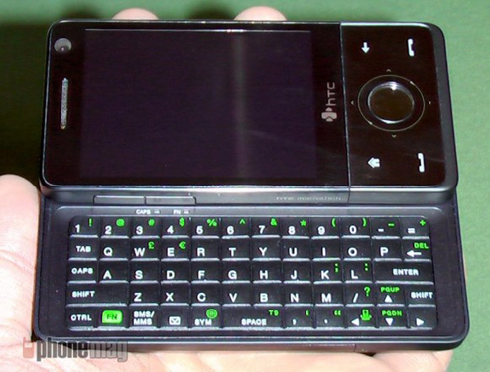
The guys over at Phone Mag managed to get their hands on the HTC Touch Pro "Raphael" and its sweet slide-out QWERTY keyboard. Unfortunately, there was no battery and the device could not be turned on—but no significant changes are expected on that front over the previous Touch handset. All in all, Phone Mag felt that the device would satisfy HTC owners and keyboard lovers alike.
Hit the following link for a full gallery. [Phone Mag]
[Via: Gizmodo, The Gadget Blog ]
[Tag: ]
Thursday, June 26, 2008
HTC Touch Diamond Hands-on Update [Htc Touch Diamond]
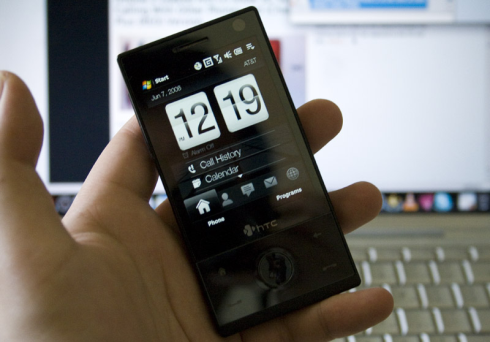
I'm still working on the full review, but I wanted to give everyone an update on that performance fix that was released last week for the HTC Touch Diamond. I installed the new ROM (it was easy, just run the executable on your PC), and now TouchFLO is noticeably faster. It's still not instant, but it's definitely improved to the point where it's usable and you won't really mind it. Yeah, it's passed that bar. I'd even say that it's just as fast as the iPhone. Current owners will be able to upgrade to the newer official ROM soon.
[Via: Gizmodo, The Gadget Blog ]
[Tag: ]
Friday, May 16, 2008
Semi-Official Sprint Mogul Windows Mobile 6.1 ROM Leaked
This isn't the final official version of the Sprint Mogul Windows Mobile 6.1 firmware update—which probably means that it shouldn't be called "official"—but it has been leaked on WinMo dev sites. New features are Sprint TV, a larger Start Menu, speedier response and of course, Windows Mobile 6.1. If you're really dying for new features on your phone you can download and install it now, otherwise we'd wait until the final version is available within the next month or so.
[PPC Geeks via WMExperts via Boy Genius]
[Via: Gizmodo, The Gadget Blog ]
[Tag: ]
Tuesday, May 6, 2008
HTC Touch Diamond: the Blurb, Specs and Official Pics

A NEW AGE FOR MOBILE PHONES BEGINS; HTC UNVEILS 'TOUCH DIAMOND'Debut brings breakthroughs in size, style connectivity and overall user experience, leaves compromise at the door.

LONDON — May 6, 2008 — Born from a unique heritage of innovation and a deep desire to blend design with simplicity, HTC Corp., a global leader in mobile phone innovation and design, today unveiled its new flagship phone, the HTC Touch Diamondпѓ¤. Delivering unmistakable style and meticulous craftsmanship the HTC Touch Diamond is defined by its compact size, game-changingВ Internet and its new captivating 3D touch interface called TouchFLOв„ўпЎї 3D. The result is an uncompromising mobile phone that sets a new benchmark for phone sophistication and shapes consumer expectations for how a phone can be used."Today we mark a new era in mobile phone evolution, an era where beauty and size integrate with uncompromising innovation at broadband speeds," said Peter Chou, president and CEO, HTC Corp. "The HTC Touch Diamond will make browsing the Web and using Web-enabled applications just as practical and easy to use as making calls."A New Dimension To Touch
HTC has taken a great leap forward in touch screen innovation with the introduction of its new 3D touch interface called TouchFLO 3D. TouchFLO 3D provides animated access to people, messaging, email, photos, music, weather and more. In addition, HTC is introducing a new innovative touch-sensitive control for interacting with Touch Diamond.Making The Mobile Internet Fun
With the introduction of the Touch Diamond, HTC delivers an entirely new mobile Internet experience that utilizes broadband-like speeds with HSDPA 7.2 Mbps and HSUPA wireless connectivity. Committed to improving Web browsing, HTC provides a new customized mobile Web browser that enables easy viewing and effortless navigation of Websites in the way they were designed. As part of this browsing experience users can zoom and pan Websites with one-hand and automatically view optimized content that has been specially created to fit the display. Turning the device sideways automatically rotates the web page view from a portrait to landscape view.In addition to Web browsing, the Touch Diamond includes a customized new, HTC-developed, YouTube application for watching a variety of user generated video content as well as utilizing Google Maps for mobile for mapping and traffic data.Unmatched Style and Size
The Touch Diamond is crafted with precision to fit comfortably in a user's hand without compromising on features or functionality. Blending contrasting design elements of metal and unique geometric facets, the Touch Diamond complements a user's personal style.Bursting with Innovation
The Touch Diamond delivers an unrivalled combination of features and functionality that set a new standard for integrating mobile phone innovation into a small package. The 2.8 inch display provides near-print quality viewing that enables beautiful Web browsing and viewing of photographs. The built-in camera includes an optical auto-focus lens that ensures the photos you take will be clear and consistent. Advanced wireless and auto sensor screen pivoting are just a few of the features that make the Touch Diamond experience a stand out.Availability
The HTC Touch Diamondв„ў will be available to customers across all major European carriers in June. It will be available later this quarter in Asia and the Middle East. The North American and Latin American versions of the Touch Diamond will be available in the second half of 2008."Our long-standing relationship with HTC meant they shared their phone concept and worked with us from the earliest stage. This early collaboration is important to us because at Orange, we know that the right multimedia experience is about more than just the phone," said Olaf Swantee, EVP of Orange's global mobile operations. "Our approach is to select and test the best phones and integrate our applications, combining them with access to the Orange World portal, the best tariffs, integrated billing, a user-friendly interface and excellent customer support. With the Touch Diamond from Orange we have created a unique phone which has taken advantage of our latest service innovation to build upon the consistently rich experience customers expect from Orange."HTC Touch Diamond Key Specifications
Size: 102 x 51 x 11.33mm
Weight: 110 g
Connectivity: WCDMA / HSPA: 900/2100MHz. HSDPA 7.2 Mbps and HSUPA
Operating system: Windows MobileВ® 6.1 Professional
Display: 2.8-inch VGA touch screen
Camera: 3.2MP, with video calling
Internal memory: 4 GB Internal Storage, 256 MB flash, 192 MB RAM,
Bluetooth: 2.0 with EDR
Wireless: WiFi 802.11b/g
GPS: GPS/AGPS
Interface: HTC ExtUSBв„ўпЎї (mini-USB and audio jack in one; USB 2.0 High-Speed)
Battery: 900 mAh
Talk time: GSM: up to 4 hours
Standby time: GSM: up to 300 hours/100 hours with push email
Chipset: QualcommВ® MSM 7201Aв„ўпЎї 528MHz
[Via: Gizmodo, The Gadget Blog ]
[Tag: ]
Hands-on With Windows Mobile Skyfire Browser Beta 0.6 [Skyfire Browser]
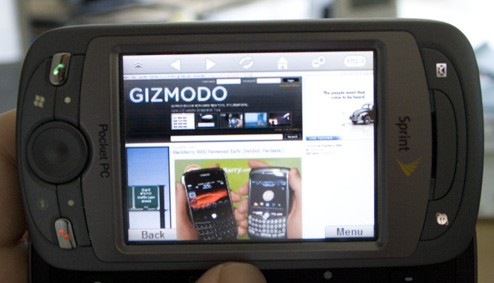
Skyfire just got its 0.6 update, bring with it a few more features (listed after the jump) and a bit of compatibility increase that makes it feel more like a real browser than it was even when we saw it at CTIA. The overall idea is the same: Skyfire servers render pages into image form, which then makes it onto your Windows Mobile phone over an internet connection. On our Sprint HTC Mogul, Gizmodo loaded pretty damn fast over EV-DO, and features like Flash actually seemed to work well.Because the page is like an image, you can pan and scroll around fast and easily, but zooming in and out is a bit clunkier. Typing in a text field requires you to type something on Skyfire's text input, then sending that to Skyfire, then sending the resulting image back to your phone.Although it touts Flash video, support, watching YouTube videos is still more like a fast slideshow than an actual video—though most of the video quality depends on your connection type and speed. It's no iPhone Safari browser—and probably will never be because of the fact that rendering is done off-phone—but it's a reasonably close approximation for now.* Multi-line text entry (2,000 character limit)
* Auto-complete text entry
* Paste into URL or search
* Ability to delete bookmarks
* Multiple zoom modes for touch screen phones
* Double tap to Zoom In and Zoom Out
* Support for custom virtual keyboards (SIP)
* Web search shortcut in softkey menu
* Access to the Windows Mobile Taskbar in softkey menu
* Persistent settings for SmartFit, Mute and Zoom size
* Support for 12-key and ВЅ QWERTY devices
* Password masking
* Backlight usage based on system settings
* OK button sends Skyfire to the background
[Skyfire]
[Via: Gizmodo, The Gadget Blog ]
[Tag: ]
Thursday, May 1, 2008
Gigabyte's GSmart Touch UI for Windows Mobile available for everyone
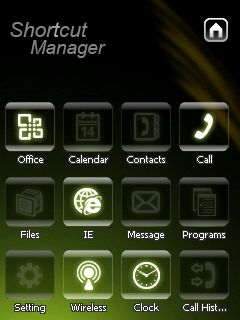 Gigabyte has released a new touch-friendly interface for Windows Mobile phones. While the Smart Touch UI is designed to run on Gigabyte's GSmart line of phones, an unofficial version of the software has been leaked and you can download it and install it on pretty much any Windows Mobile 5.0/6 device.
It's hard not to compare the Smart Touch interface to the Apple iPhone interface. Applications can be luanched by pressing large square-ish buttons, and you navigate the interface by dragging your finger across the screen. But Smart Touch does have a few innovative features up its sleeve.
When you first load the UI, you'll see just 4 icons on the bottom of the screen. But you can find more by moving your finger along the bottom of the screen to find 16 in all, including one square that you press to add new items to your menu. You can also customize your menu by dragging and dropping icons across the screen. You can easily flip back and forth between the Smart Touch interface and the default Windows Mobile UI by hitting the Today icon. To switch back, just hit the Smart Touch icon on your today screen.
You can check out a video of Smart Touch in action after the jump.
[Via: the::unwired ]
[Tag: ]
Wednesday, April 30, 2008
iSwish: Yet another pretty iPhone clone for Windows Mobile
While Flick Software's iSwish Project certainly isn't the first attempt we've seen to emulate the iPhone interface for Windows Mobile, it's definitely one of the prettiest, most effective looking. At least if we go on the video above. But if you look closely, you'll notice a few things in this video:
- While the demonstration shows a user zooming in and out of pictures by "pinching" the screen, our guess is that the device, which doesn't recognize multi-touch is actually just detecting the motion of one finger.
- The program launcher interface is pretty, but at least once in the video, we're pretty sure we caught the producers stopping and restarting the video to make it look like an application actually started up more quickly.
The biggest problem with any iPhone clone for Windows Mobile is that beauty is only skin deep. The software appears to include a program launcher and support for SummerBoard themes, and maybe a program or two. But once you launch your application, you'll find that you've still got the same Windows Mobile software running under the hood. Some of it's pretty, some of it's functional, and some is anything but (Pocket Internet Explorer, anybody?)
Flick's iSwish is due out sometime in May, and should work with a variety of Windows Mobile devices, including older gizmos like the Dell Axim X50, which does not (officially) run Windows Mobile 6. So there's hope if you've got an older PDA or phone.
[Via: Engadget ]
[Tag: ]
Subscribe to:
Posts (Atom)